Automation · · 5 min read
Power Automate task mining: find the first workflow worth automating
Use Microsoft's sample recordings, process map, and application analysis to turn a vague automation idea into a testable pilot.
By Sociologix Editorial
Open the process before you automate it
If your team is considering AI for invoice handling, the first useful screen may be a process map rather than a chatbot. Power Automate's task mining capability analyzes recorded desktop actions to help identify repeated steps, variations, and automation opportunities. Process mining uses business event data to examine the wider process. They answer related but different questions. [1][2]
This documentation-based walkthrough uses Microsoft's invoice-submission sample as a learning environment, then describes how to choose your own pilot. Product details were checked on September 19, 2026. The screenshots and sample timings belong to Microsoft's demonstration; they are not measurements from Sociologix or a customer.
1. Load the task-mining sample
Use a suitable Power Automate environment and confirm access with your administrator. Open Process mining, then Processes once before importing the sample. Microsoft's tutorial notes that initializing this area first avoids an incomplete recording list. From Solutions, choose Import solution and import the RPA in a Day ZIP linked in the tutorial. Open Invoice submission under your processes. [3]
Work with the supplied sample first. This lets you understand the reports without recording a colleague's desktop or mixing test data with an operational process. For a real pilot, agree on the selected task, the data that may be captured, and who may view it before collecting recordings.
Do not assume every feature is included with your existing subscription. Check the environment and entitlements with the Power Platform administrator before planning a rollout; this article does not quote a license price.
2. Read the map as a sequence of work
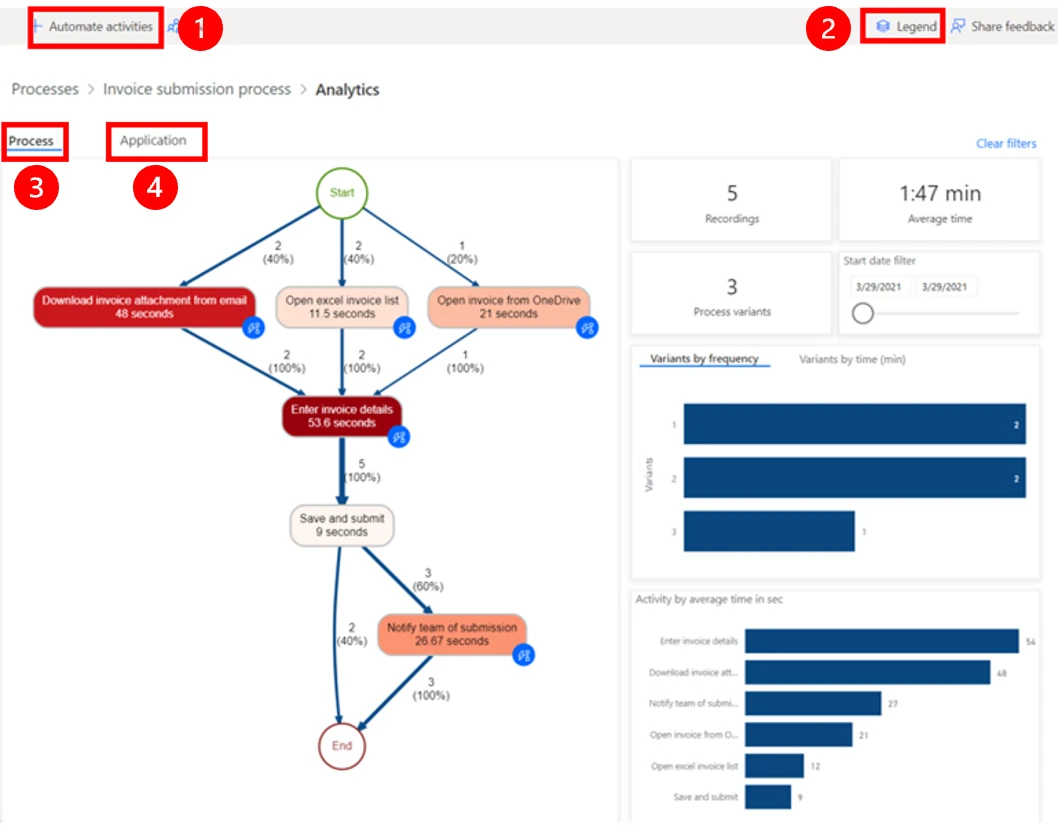
Choose Analyze and wait for the process to reach its analyzed state, then open Analytics. The Process map shows activities and paths; the variants view separates different sequences. The Application view helps identify which applications are involved. [3]
Look for a concrete question: where does a person repeatedly copy the same invoice fields, and what happens immediately before and after? Select a common path and compare it with a less common one. A detour may represent rework, but it may also be a necessary exception. Ask the task owner before labeling it waste.
Write down the input and output of the candidate step. "Extract invoice number, supplier, and total from an approved attachment into a review record" is more actionable than "automate invoices." It also exposes which parts require document extraction, deterministic validation, and a person.
3. Choose task mining or event-log analysis
Task recordings help when the unknown is how people move through desktop applications. If the question is where an entire request waits across systems, inspect event data instead. Microsoft's process-mining tutorial imports a sample CSV and maps attributes including CaseId, ActivityName, StartTimestamp, and EndTimestamp before analysis. [4]
For your own export, first inspect a few cases manually. A case ID must refer to the same business item across its events. Decide whether a timestamp marks arrival, completion, or an update. Mixing those meanings can produce a convincing chart that answers the wrong question.
Keep desktop activity time separate from end-to-end elapsed time. Reducing typing may help an employee without changing a two-day approval queue. Conversely, routing work to the right reviewer may reduce elapsed time even when the number of clicks stays similar.
4. Turn a candidate into a small flow
The task-mining tutorial includes Automate activities, which can suggest actions associated with the recorded applications. Treat the resulting flow as a draft that needs configuration and validation. [3]
Our suggested first pilot is a review queue: receive an approved test invoice, extract the fields, validate required values, and show the source document beside the proposed record. Keep posting to a financial system outside the initial scope. This makes extraction errors visible before they become downstream corrections.
- Test a clean document, a missing invoice number, a repeated upload, and an unsupported file.
- Show the original source and extracted values together so a reviewer can correct them.
- Give failures a visible status and an owner; a silent flow run is not a completed business task.
5. Compare accepted work before expanding
Measure a comparable batch before and after the pilot. Record active handling time, correction time, elapsed time, and accepted records. Include exceptions rather than excluding them to improve the headline number.
For a simple capacity calculation, multiply the number of accepted records by the reduction in total handling minutes, then divide by 60. Treat the answer as estimated time released, not automatic payroll savings. Add recurring platform and review costs separately.
Expand only the step that demonstrably helps. The process map should leave you with an implementation decision, a named owner, and a useful measure—not simply a more attractive diagram.
Sources & further reading
Turn one repetitive process into a working pilot.
Share the workflow and the Microsoft systems your team uses. Sociologix can help map the task, connect automation, and design a review process with measurable outcomes.
Talk to Sociologix