Automation · · 5 min read
n8n Data Tables: keep AI lead drafts ready for review
Build a small lead-review table in n8n, preserve decisions on retries, and keep generated drafts separate from customer delivery.
By Sociologix Editorial
Give a draft a place to wait
This AI-assisted editorial guide proposes a small n8n workflow for reviewing AI-written replies to incoming project requests. It is based on official documentation checked November 14, 2026; no n8n instance, model call or customer delivery was run for this article.
The example is deliberately modest: a fictional request, LEAD-DEMO-001, asks for a property website with an inquiry form. The model suggests a summary and follow-up questions. A person decides whether the draft is useful. Keeping that decision in a table makes it easier to inspect than leaving it only in an execution log.
n8n Data Tables persist structured records inside n8n for use across workflows. The Data Table node provides row retrieval and changes; the project interface also lets you manage records manually. [1]
1. Create the review table
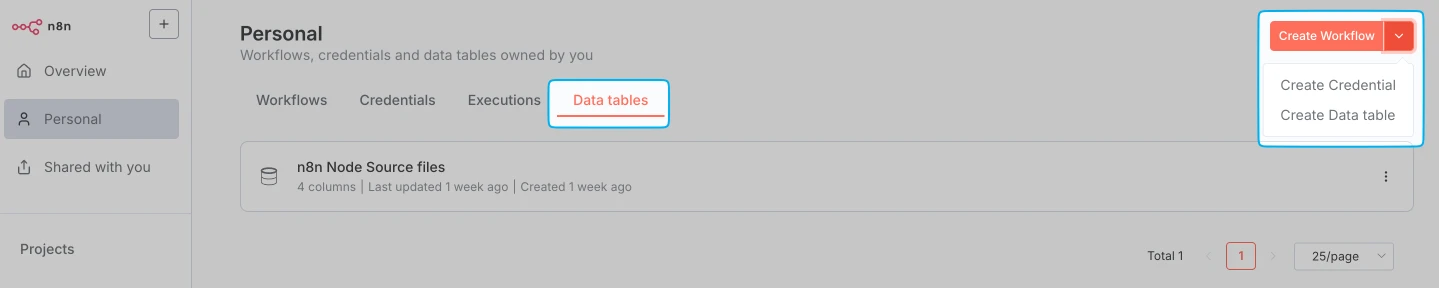
In your project, open Data tables, choose Create Data table and start from scratch. Name it lead_review_demo. The screenshot above identifies the menu. Check project access first: members can access project tables by default, and administrators and the owner can see users’ tables. [2]
Use the following proposed schema. The documented column types include String, Date, Number and Boolean; this design only needs the first two. [3]
- request_id — String. Preserve the intake system’s identifier; do not ask the model to invent it.
- brief and draft_reply — String. Keep the original request separate from the model’s proposed response.
- review_state — String. Use received, needs_review, approved or rejected as your own workflow convention.
- reviewer_note — String; reviewed_at — Date. Leave these empty until a person makes a decision.
2. Separate new requests from retries
Validate a nonempty request identifier and brief before reaching the table. For a manual pilot, use the fictional request above and process one request at a time through one controlled writer. Preserve this validated intake separately so a lookup cannot replace it with stored data.
Use one Data Table lookup: Resource Row, Operation Get, request_id Equals the validated identifier, Return All disabled, Limit 2. A single lookup avoids separately evaluated existence checks. In this lookup’s Settings, enable Always Output Data so zero matches still produce an empty item. This documented setting keeps a no-result lookup from ending the path. [4][5]
Inspect the whole result before continuing in the manual pilot. Ignore the empty placeholder when counting saved records: zero means new; one means existing; two means stop for reconciliation. An automated implementation needs one decision for the complete result batch, rather than one decision per returned row. These checks are not an atomic claim.
For a new request, Insert the identifier, brief and received state using manual mapping from the preserved intake. For an existing record, route by saved state: preserve needs_review, approved and rejected. A received record with no draft may enter an explicit retry path.
Avoid a blanket Upsert that writes received on every retry: it could overwrite a reviewer’s decision. Treat changed scope as an explicit revision, rather than silently replacing an approved draft.
3. Save model output without giving it approval authority
Connect your existing, authenticated model workflow only to the new-request or explicit-retry path. Ask it for a short response and missing-information questions. Tell it to avoid prices, delivery dates and claims about work your team has not confirmed.
Before any table update, validate that the model returned text and that trimming whitespace leaves a nonempty draft. Route failed validation to investigation without changing received. Map only validated text into draft_reply and set needs_review in workflow configuration. Keep identifiers and reviewer fields outside model-controlled mappings; a failed model call must also leave received visible.
Use Row → Update with conditions for both the identifier and received state, selecting All Conditions. Enable Dry Run first to inspect the proposed change. These settings are documented; the separation of model and reviewer fields is our design recommendation. [4]
4. Review a bounded batch and rehearse failure cases
For a review list, use Get with review_state equal to needs_review, Return All disabled and Limit set to 20. A person can inspect the brief and draft in the table interface, then record a decision and note. State labels do not enforce authorization: project access and workflow design still need separate review.
Before connecting real intake, rehearse this acceptance checklist with synthetic records. These are proposed checks, not reported test results.
- A new request creates a received record; a successful draft changes it to needs_review.
- A repeated request preserves an existing draft, approval or rejection.
- An empty model response or failed generation leaves the request available for investigation.
- Two records with the same request_id trigger manual reconciliation before any later delivery is considered.
Know where the pilot stops
n8n warns that paginated reads during concurrent changes can miss or repeat rows; a continually growing Return All read may not finish. A small Limit bounds the requested result count, but does not create a consistent snapshot. Dry Run and matching conditions likewise do not establish locks or exactly-once processing. [4]
Before increasing concurrency, design transaction-backed uniqueness and work claiming in an appropriate database or queue. This walkthrough contains no sending step: an approved row is only a review decision, not proof that a customer received anything.
The current documented default is 200 MiB across all Data Tables in an instance. Writes can fail when capacity is exceeded. Store short text here, not proposal attachments; define retention and export procedures. The interface supports Download CSV. [2]
Sources & further reading
Build a lead-review workflow your team can inspect
Sociologix can help map your intake fields, AI drafting step, reviewer access and handoff into a practical automation pilot. Bring a sample brief and the decisions a person must retain.
Talk to Sociologix