Automation · · 5 min read
Validate n8n lead webhooks before connecting AI and your CRM
Add a small JavaScript validation gate, explicit success and error responses, and retry checks before a website inquiry reaches an AI worker or CRM.
By Sociologix Editorial
Check the inquiry before asking AI to interpret it
A website inquiry is a small integration contract: the receiving workflow needs predictable fields before it can classify a request or create a CRM record. A missing email address is not something an AI worker should repair by guessing. Start with deterministic checks and make their outcome visible to the calling application.
This AI-assisted editorial tutorial uses official n8n documentation checked October 3, 2026. Its JavaScript validator was tested locally with synthetic inputs. The complete workflow was not run in a connected n8n instance, and no CRM records or messages were created. The field rules below are an example contract, not Sociologix intake policy.
1. Put the webhook behind your website backend
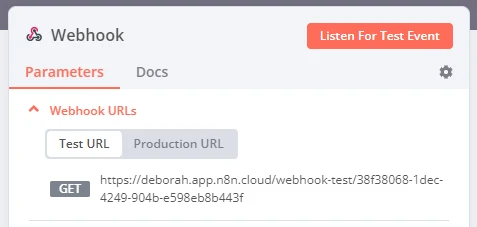
Create a test workflow with a Webhook node. Choose POST and a unique path, then set Respond to Using Respond to Webhook Node. During development, select the Test URL and start listening for a test event. Production has a separate URL that is registered when the workflow is published. Do not copy the demonstration URL pictured above. [1]
For this server-to-server design, select Header Auth and configure a header name and secret value in an n8n credential. Store the matching value in your website backend environment, never in public JavaScript. n8n documents Header Auth as a name/value credential. [2]
Have the backend validate the public form, apply request-size and abuse controls, and forward JSON to n8n. The validation gate below is a second check at the workflow boundary. Authentication alone does not make inquiry content trustworthy or prevent an authorized caller from sending a malformed body.
2. Add a Code node that returns a decision
Connect Webhook to a Code node using JavaScript and Run Once for All Items. n8n documents that mode as executing once for the incoming items. This example expects one webhook request body and returns one decision item. It uses only ordinary JavaScript and requires no package installation. [3]
Paste the code below. It trims strings, checks field sizes, restricts service identifiers and copies only the allowed fields. The email expression is a deliberately simple format check, not proof of mailbox ownership or a complete validator for every valid email format. Adapt the rule to your audience.
The example rejects overlong values instead of silently truncating the customer’s request. Extra properties are dropped. It does not remove dangerous instructions from a message: later AI steps must still treat the message as customer data rather than trusted workflow instructions.
function validateLead(body) {
  if (!body || typeof body !== 'object' || Array.isArray(body)) {
    return { ok: false, errors: ['body_must_be_object'] };
  }
  const errors = [];
  const text = (key, min, max) => {
    const value = body[key];
    if (typeof value !== 'string') {
      errors.push(key + '_must_be_text');
      return '';
    }
    const cleaned = value.trim();
    if (cleaned.length < min || cleaned.length > max) {
      errors.push(key + '_length');
    }
    return cleaned;
  };
  const requestId = text('requestId', 16, 80);
  const name = text('name', 1, 120);
  const email = text('email', 3, 254);
  const service = text('service', 1, 40);
  const message = text('message', 20, 4000);
  if (!/^[A-Za-z0-9_-]+$/.test(requestId)) errors.push('requestId_format');
  if (!/^[^\s@]+@[^\s@]+\.[^\s@]+$/.test(email)) errors.push('email_format');
  if (!['ai-agents', 'automation', 'website'].includes(service)) {
    errors.push('service_unknown');
  }
  if (errors.length) return { ok: false, errors: [...new Set(errors)] };
  return {
    ok: true,
    lead: { requestId, name, email, service, message },
  };
}

// n8n Code node: JavaScript, Run Once for All Items.
return [{ json: validateLead($input.first().json.body) }];
3. Give both branches an explicit response
Add an If node after Code. Set a Boolean condition on {{$json.ok}} using is true. The node routes data according to its comparison result. Keep the false and true paths separate for this exercise. [4]
On the false branch, add Respond to Webhook with Respond With set to JSON, Response Code 422 and Response Body in expression mode: {{ { ok: false, errors: $json.errors } }}. Return field error codes, not the submitted message or authentication headers.
On the true branch, use another Respond to Webhook with JSON, Response Code 200 and expression {{ { ok: true, stage: "validated", requestId: $json.lead.requestId } }}. This test response means validation passed; it does not mean a lead was saved. The response node supports custom JSON and status codes. Only the first response sent takes effect, so do not place two response nodes sequentially. [5]
4. Exercise the failure paths before adding side effects
Use your backend or an HTTP client with the configured authentication header and Content-Type: application/json. Send this fictional payload to your own Test URL while the Webhook node is listening. Inspect the Code output and the actual HTTP status and body, not just the green node indicators.
Then vary one field at a time. A valid request should return stage validated and its identifier. Invalid fields should take the 422 branch. These are expected acceptance checks, not reported observations from a live n8n server.
{
  "requestId": "demo-request-0001",
  "name": "Demo Customer",
  "email": "demo@example.com",
  "service": "automation",
  "message": "We want to organize incoming inquiries and prepare a review queue."
}- Send null or an array as the body: reject it without trying to interpret it as a lead.
- Replace email with an object or remove message: return field errors rather than a guessed value.
- Send a 4,001-character message or an unknown service: reject it and explain which field needs attention.
- Add an unexpected property such as approvedPrice: confirm it is absent from the validated lead.
- Omit the authentication header: confirm rejection before the Code node runs.
5. Add storage before promising receipt
When the validation-only exercise passes, put durable storage on the valid branch before the success response. Choose a database operation or CRM integration that can enforce an appropriate uniqueness rule. A requestId helps correlate retries, but this validator does not deduplicate them. Use a server-issued identifier scoped to the caller and enforce uniqueness atomically in storage.
Test a repeated request and a storage failure. Return a receipt only after the record is durably saved, or after a durable queue has accepted it if that is your architecture. Make the receipt say what happened. A browser timeout should not force the customer to guess whether another submission will create a duplicate.
n8n documents a subtle failure mode: a workflow that finishes without executing Respond to Webhook can return a standard 200 response. Check every reachable branch. An error before the first response instead produces a 500 response. Neither response should be mistaken for your application’s explicit saved receipt. [5]
Finally, connect AI classification or summarization to the saved record. Keep the original inquiry, model-derived suggestions and human corrections distinguishable. Review execution-log retention and access before sending real customer details. The first production milestone is reliable intake and recovery, not unattended outreach.
Sources & further reading
Make your lead intake reliable before you scale it
Sociologix can help connect website inquiries, validation, CRM records and AI-assisted follow-up with clear review and recovery paths. Bring your current form and the tools your team uses to manage leads.
Talk to Sociologix