AI agents · · 5 min read
Presidio: test contact replacement before an AI handoff
Build a local replacement preview for two contact formats, inspect the result and test the details that still need review before an AI worker receives a note.
By Sociologix Editorial
Inspect the note before handing it to an AI worker
A customer-intake note can mix useful project requirements with contact details the next step does not need. Before sending it to an AI summarizer, a workflow can prepare a replacement preview for review. The important question is what remains in that preview, not whether a tool has returned successfully.
This AI-assisted editorial guide tests Presidio Anonymizer with fictional notes and two deliberately narrow contact patterns. It replaces matching spans locally and always returns needs_review. It does not send a note to a model, process customer records or approve the result for sharing.
Presidio is now a community-owned Data Privacy Stack project following its transition from Microsoft. The current official documentation explains that change. [1]
1. Install just the replacement component
We tested presidio-anonymizer 2.2.366 with Python 3.13.15 on Windows on November 12, 2026. That release’s package metadata requires Python 3.11 or later and earlier than 3.15, and lists the MIT license. [2]
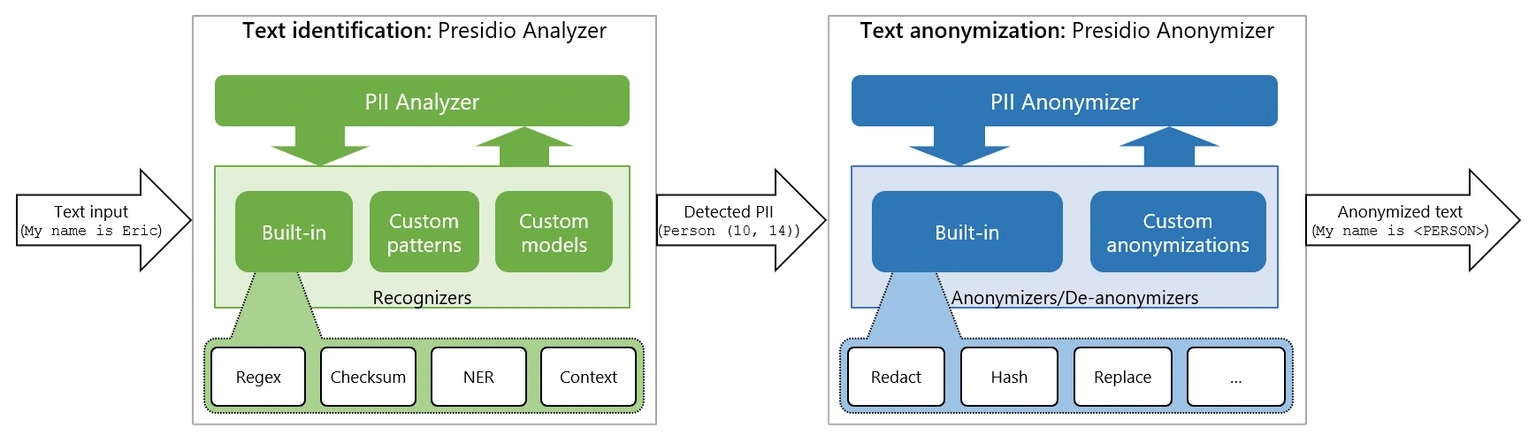
The Anonymizer accepts text, entity spans and operator configuration. The official quickstart constructs RecognizerResult objects directly. [3] We use that path with Python regular expressions, without installing presidio-analyzer or downloading an NLP model. This is not a test of Presidio’s built-in detection coverage.
Run these PowerShell commands in a new folder, saving the next block as contact_preview.py before the final command. Installation needs internet access; the example then makes no network calls.
mkdir presidio-contact-demo
cd presidio-contact-demo
python -m venv .venv
.\.venv\Scripts\python.exe -m pip install "presidio-anonymizer==2.2.366"
# Save contact_preview.py below first.
.\.venv\Scripts\python.exe contact_preview.py
2. Separate finding a span from replacing it
Our email pattern recognizes a limited ASCII email-shaped string. Our phone pattern recognizes a plus-one number with hyphens, such as +1-407-555-0123. Neither validates ownership, reachability or every permitted format. These are demonstration rules defined by this adapter.
Each match supplies a start and end index into the original Python string. RecognizerResult carries those positions and an entity label. The API uses those spans to apply the configured operator; replace inserts the chosen new_value. [4] The fixed score of 1.0 below marks our selected matches. It is not a measured probability that a value is personal information.
The adapter limits input to 1–5,000 characters and returns only the replacement text, the number of output replacement items and needs_review. It does not return matched originals or print the input. The command-line fixture prints only its fictional preview results.
import json
import re
from presidio_anonymizer import AnonymizerEngine
from presidio_anonymizer.entities import OperatorConfig, RecognizerResult

# Demonstration patterns, not comprehensive contact detection.
PATTERNS = {
    "DEMO_EMAIL": re.compile(r"[A-Za-z0-9._%+-]+@[A-Za-z0-9.-]+\.[A-Za-z]{2,}"),
    "DEMO_US_PHONE": re.compile(r"(?<!\d)\+1-\d{3}-\d{3}-\d{4}(?!\d)"),
}
ENGINE = AnonymizerEngine()


def preview_replacement(text):
    if not isinstance(text, str) or not 1 <= len(text) <= 5000:
        raise ValueError("Provide 1 to 5000 text characters")
    spans = [
        RecognizerResult(entity_type=kind, start=m.start(), end=m.end(), score=1.0)
        for kind, pattern in PATTERNS.items()
        for m in pattern.finditer(text)
    ]
    result = ENGINE.anonymize(
        text=text,
        analyzer_results=spans,
        operators={
            "DEMO_EMAIL": OperatorConfig("replace", {"new_value": "[EMAIL]"}),
            "DEMO_US_PHONE": OperatorConfig("replace", {"new_value": "[PHONE]"}),
        },
    )
    return {"status": "needs_review", "text": result.text,
            "replacement_items": len(result.items)}


if __name__ == "__main__":
    # Fictional examples only. Nothing is sent to an AI provider.
    examples = {
        "matched": "Alex Rivera: alex.rivera@example.com; +1-407-555-0123.",
        "missed_format": "Alex Rivera: (407) 555-0123; alex [at] example [dot] com.",
    }
    print(json.dumps({name: preview_replacement(text)
                      for name, text in examples.items()}, indent=2))
3. Compare the matched and missed examples
The matched fixture returned Alex Rivera: [EMAIL]; [PHONE]. with two replacement items. Alex Rivera remained in the output because this adapter has no person-name detector. Both results still carried needs_review.
The alternate fixture used (407) 555-0123 and alex [at] example [dot] com. It returned the original text with zero replacement items. A successful function call therefore did not mean the note was ready to share.
Twelve local tests passed: email replacement; phone replacement; Unicode and punctuation preservation; a plus-tagged email with a subdomain; repeated email occurrences; a no-match note; an alternate phone format that remained visible; an obfuscated email that remained visible; a retained name; overlapping email and phone spans; input types and length bounds; and a second pass that still required review.
The Unicode fixture began with an emoji and Café. Both survived while the later contact spans were replaced. This checks the actual Python-string offsets in our local example; it is not evidence that offsets from another service or text representation are interchangeable.
4. Check overlaps and counts carefully
One test used user+1-407-555-0123@example.com. Both demo patterns matched part of that string: the phone-shaped portion sat inside the email-shaped span. The output was a single [EMAIL] item. Presidio documents how contained and overlapping entities are resolved. [3]
That is why replacement_items counts the returned items, not people, unique contact details or all raw pattern matches. Repeated contact values can represent multiple occurrences. Overlaps can change how many output replacements appear.
If a real detector supplies offsets, keep the exact source text attached to that detection result. Normalizing whitespace or changing line breaks before replacement can move positions. Validate that spans still refer to the intended substrings, and evaluate your chosen overlap policy with representative fixtures.
5. Keep review and data handling in the workflow
Presidio’s own documentation warns that automated detection cannot guarantee finding all sensitive information. [5] This small adapter has much narrower coverage than the full product: it does not find names, addresses, other phone formats, images or contact details embedded in attachments.
For an AI handoff, first decide which fields the summarization task actually needs. Where practical, construct the input from those fields rather than forwarding an entire intake record. Evaluate detection and replacement against representative examples that you are authorized to use, including missed formats and false matches.
Keep the preview awaiting review even when there are zero matches or a second pass finds nothing new. If your workflow cannot obtain the required review, retain the note inside the restricted workflow rather than treating a zero count as approval.
Replacing text does not remove copies in the original record, logs, traces, exports or backups. Set access and retention for those locations separately. This local experiment establishes replacement behavior on synthetic inputs; it makes no claim of complete de-identification or compliance.
Sources & further reading
Design an AI handoff with review built in
Sociologix can help map the information your AI workflow needs, build a replacement preview and connect review to the next processing step. Bring a fictional sample note and your intended handoff requirements.
Talk to Sociologix