Automation · · 6 min read
Tesseract.js: read intake images before an AI handoff
Run local OCR on a typed intake image, keep its source fingerprint, and route blank or unreviewed results before an AI worker uses them.
By Sociologix Editorial

Make image text reviewable before asking AI to use it
An intake workflow often starts with an image instead of a searchable document. Optical character recognition can turn those pixels into text that a reviewer can inspect and an AI worker can later summarize. The useful first step is a traceable text record, with an explicit decision about what happens when extraction returns nothing.
This AI-assisted editorial guide tests Tesseract.js against a fictional typed intake image and a blank control. It uses no customer documents and calls no generative AI service. The example demonstrates OCR and a small review policy; it does not create a client account, update a CRM or prove accuracy on photographed forms.
1. Pin the package and download the test images
The naptha/tesseract.js project provides a JavaScript interface to the Tesseract OCR engine. Its v7 README requires Node.js 16 or later. We ran the example with Node.js 24.19.0 and tesseract.js 7.0.0 on October 25, 2026. The package is published under Apache-2.0. [1] [2]
Use a new scratch directory for these PowerShell commands. The two downloads are the exact synthetic PNGs used below: one contains an invented request identifier, company and service; the other is entirely white. Save the next JavaScript block as ocr-demo.mjs before running the final command.
Installation needs internet access. Worker initialization may also download English language data when it is not cached. Local image recognition does not make a default first run fully offline; arrange and test local language assets separately if that is a requirement. [3]
mkdir ocr-intake-demo
cd ocr-intake-demo
npm install --ignore-scripts "tesseract.js@7.0.0"
Invoke-WebRequest "https://sociologixllc.com/images/editorial/tesseractjs-ocr-intake-before-ai-review-input.png" -OutFile intake-demo.png
Invoke-WebRequest "https://sociologixllc.com/images/editorial/tesseractjs-ocr-intake-before-ai-review-blank.png" -OutFile blank.png
# Save the JavaScript block below as ocr-demo.mjs first.
node ocr-demo.mjs
2. Recognize both images and preserve the evidence
The program reads local files into buffers, creates one English worker and recognizes the images sequentially. A finally block terminates the worker after recognition or a later check fails. The API exposes recognized text through data.text. Reusing the worker avoids repeatedly initializing it for these two images. [4] [5]
Our reviewRecord function keeps the raw OCR text, filename and SHA-256 digest of the exact input bytes. The digest helps associate a result with its source; it does not authenticate the document. Nonempty text receives pending_review. Empty text receives needs_rescan. Neither state authorizes a business action.
The artificial confidence-99 record is a policy check, separate from the actual OCR runs. It verifies that this helper does not promote text into an approved state because of a high score. Copy the complete block unchanged for the provided fixtures.
import assert from 'node:assert/strict';
import { readFile } from 'node:fs/promises';
import { createHash } from 'node:crypto';
import { createWorker } from 'tesseract.js';

function reviewRecord(data, filename, bytes) {
  return {
    source: {
      filename,
      sha256: createHash('sha256').update(bytes).digest('hex')
    },
    ocrText: data.text,
    engineConfidence: Number.isFinite(data.confidence)
      ? data.confidence : null,
    status: data.text.trim() ? 'pending_review' : 'needs_rescan'
  };
}

const input = await readFile(new URL('./intake-demo.png', import.meta.url));
const blank = await readFile(new URL('./blank.png', import.meta.url));
const worker = await createWorker('eng');
try {
  const { data } = await worker.recognize(input);
  const { data: empty } = await worker.recognize(blank);
  const record = reviewRecord(data, 'intake-demo.png', input);
  const blankRecord = reviewRecord(empty, 'blank.png', blank);
  const highScore = reviewRecord(
    { text: 'UNVERIFIED VALUE', confidence: 99 }, 'control', input);
  const checks = [
    ['request identifier', () => assert.match(data.text, /INTAKE-2048/)],
    ['company text', () => assert.match(data.text, /NORTHSTAR DEMO/)],
    ['service text', () => assert.match(data.text, /WORKFLOW AUTOMATION/)],
    ['source fingerprint', () => assert.match(record.source.sha256, /^[a-f0-9]{64}$/)],
    ['original OCR retained', () => assert.equal(record.ocrText, data.text)],
    ['clean input still needs review', () => assert.equal(record.status, 'pending_review')],
    ['blank input needs rescan', () => {
      assert.equal(empty.text.trim(), '');
      assert.equal(blankRecord.status, 'needs_rescan');
    }],
    ['high-score control never approves', () => assert.equal(highScore.status, 'pending_review')]
  ];
  for (const [name, check] of checks) {
    check(); console.log('PASS:', name);
  }
  console.log(JSON.stringify({ record, blankRecord }, null, 2));
} finally {
  await worker.terminate();
}
3. Compare your results with the observed run
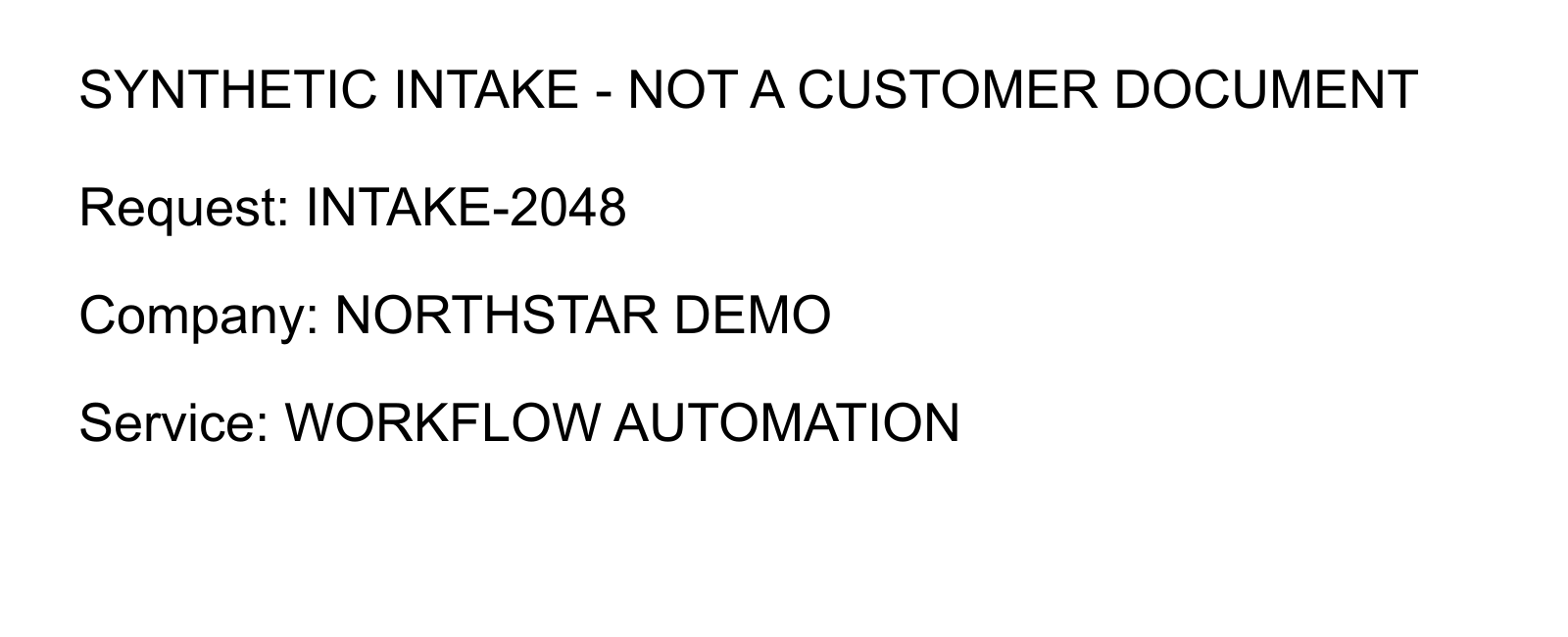
All eight checks passed locally. The typed image produced the expected request identifier INTAKE-2048, the company NORTHSTAR DEMO and the service WORKFLOW AUTOMATION. Its original OCR text remained in the record alongside a 64-character source digest. The returned engineConfidence was 94, and the status remained pending_review.
The blank image completed recognition with empty text and confidence 0. Our policy changed its status to needs_rescan. The API documentation explicitly notes that an image with no detected words can return successfully, so a resolved promise alone is not evidence of a usable intake. [4]
The run emitted a resolution warning but still returned the results above. These are observations from two clean, generated fixtures, not a scan-quality benchmark. Preserve failures and unexpected output when you repeat the test rather than quietly editing the recognized text until assertions pass.
4. Test the documents your workflow really receives
Tesseract.js does not directly accept PDF files. A PDF workflow needs a separate extraction or rendering step. Its FAQ also cautions that handwriting is a poor fit. Start with the actual document types you plan to support; this printed-text fixture establishes neither PDF handling nor handwriting recognition. [6]
Build a small approved evaluation set with expected identifiers and field values. Include skewed photos, low contrast, cropped labels, blank pages and incorrect-language inputs. Compare exact business fields against their references, not just whether some text appeared. Review engine confidence as a diagnostic; it is not a percentage guarantee that a customer name or amount is correct.
Before accepting uploads, add file-type, byte-size and decoded-pixel limits, access controls, retention rules and bounded job concurrency. Those production controls are outside this fixed-file example. Avoid creating an unlimited worker for every arriving document; the project recommends a bounded pool for parallel recognition. [5]
5. Connect the reviewed result to an AI worker
A useful next stage can propose a structured project brief from approved OCR text while retaining the image reference and unresolved fields. Have a person compare consequential identifiers, amounts and dates with the source before downstream changes. A separate approval decision should control any CRM update, quote or customer message.
Treat recognized document text as external content. A sentence inside an image is not permission to execute a tool or reveal another client’s records. Log review decisions without indiscriminately copying document contents into operational logs. These are proposed integration choices, not capabilities implemented by the demonstration.
Sources & further reading
- Tesseract.js v7.0.0 README: runtime, scope and worker usage
- Official tesseract.js 7.0.0 package metadata and license
- Tesseract.js local installation and language-data downloads
- Tesseract.js API: recognition results, empty output and worker cleanup
- Tesseract.js performance guide: worker reuse and bounded pools
- Tesseract.js FAQ: PDF and handwriting limitations
Build an intake workflow your team can review
Sociologix can help connect document intake, AI-assisted drafting and process automation with clear review handoffs. Bring one approved sample document and the task it needs to support.
Talk to Sociologix